
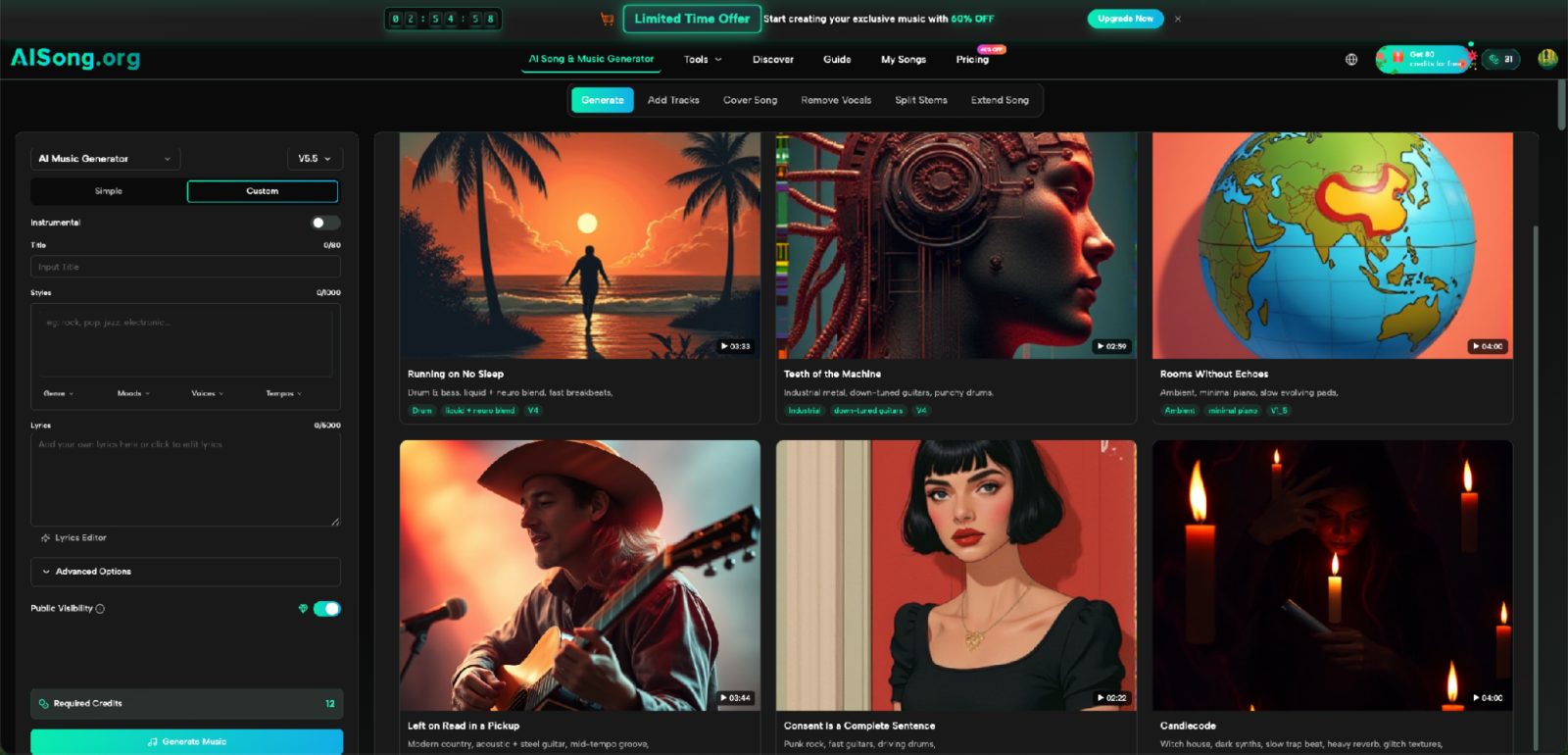
A few years ago, the novelty of AI music was simple: type a prompt, wait, and hear a finished track. That was enough to impress people. It is less useful once creators try to work with the result. A podcaster may like the melody but want a cleaner intro. A video editor may want the instrumental without the vocal. A songwriter may want to keep the lyrics but try a different arrangement. That is why newer tools are moving beyond one-click output. Platforms such as AI Song now sit closer to a small creative workspace, where generation is only the first step.
The Real Shift Is From Output to Control
The important change is not that AI can produce more genres. It is that users increasingly expect to do something with the first result.
A one-shot generator treats the track as an endpoint. An editable system treats it as material. That difference matters because creative work rarely ends with version one. A creator might need a shorter opening for a reel, a vocal-free section for narration, or another version that keeps the same lyrical idea but changes the musical feel.
This is similar to what happened in visual AI. Early tools focused on making an image from text. Later workflows added editing, inpainting, reference images, variations, and selective changes. Music tools are now heading in a comparable direction: not only “make a song,” but “make a song, then keep working.”
Three Kinds of Control Matter Most
Not every extra button makes an AI music product more useful. For most creators, three types of control make the biggest practical difference.
1. Control Before Generation
The first layer is deciding how much information to provide before the track is made.
A simple mode is useful when the idea is still loose. Someone can describe a mood, genre, subject, or general direction and let the system fill in the rest. A custom mode becomes more useful when the user already has lyrics or wants to define the structure more clearly.
This distinction sounds basic, but it solves two very different jobs. The person making a birthday song from a short idea does not need the same interface as a songwriter who already has verses and a chorus. Putting both users through one rigid workflow would make the tool harder for at least one of them.
2. Control Over the Musical Parts
The second layer appears after generation.
A finished mix can be convenient, but creators often need access to individual elements. If a video editor wants dialogue over a track, the vocal may be distracting. If a singer wants to practice, an instrumental version may be more useful. If a producer wants to rearrange the material in a DAW, separated stems create more possibilities than a single stereo file.
This is where tools such as vocal removal and stem splitting become more than side features. They turn a generated song into something that can enter a broader production process.
3. Control Through Reworking, Not Restarting
The third layer is the ability to continue from existing material instead of throwing it away.
Creators frequently reach a point where 80 percent of a result works. Starting over can destroy the parts they liked. A better workflow lets them preserve the useful core and change what is weak.
For example, a creator might want to keep a vocal idea and add instrumental backing, or work from an instrumental and add a vocal layer. AISong publicly describes Add Tracks tools for these types of tasks. An AI Music Generator becomes more valuable when it supports revision rather than forcing every experiment back to zero.
Why This Matters for Everyday Creators
The strongest use case is not necessarily a professional album.
Consider a small podcast team. They need a short intro, a softer bed under speech, and perhaps an instrumental transition between segments. A single generated track might provide the starting point, but the team still needs to adapt it to several contexts.
A YouTube creator has a similar problem. The music under a talking section should not fight the voice. The same creator may want a fuller version for the opening and a lighter version for the middle of the video.
Even a student making a presentation can benefit from this shift. The challenge is rarely “Can I generate music at all?” The challenge is “Can I make this music fit the thing I am already building?”
Editable workflows answer the second question.
The New Skill Is Giving Better Creative Direction
As the tools become more capable, users still need to make decisions.
One useful habit is to describe music in concrete terms rather than vague emotional labels. “Energetic” can mean many things. “Upbeat indie pop with bright guitar, steady drums, and a warm chorus” gives the system more direction.
The same principle applies to lyrics. If the user already has words, structure helps. Clear sections such as verse, chorus, and bridge give the generation process a better map than one uninterrupted block of text.
The goal is not to become a music theorist. It is to communicate the outcome more clearly.
A practical test is to ask three questions before generating:
- Where will this track be used?
- Which part matters most: lyrics, mood, rhythm, or instrumentation?
- What will probably need to change after the first version?
Those questions reduce random prompting and make later editing more purposeful.
What Users Should Still Treat Carefully
More editing options do not remove the need for judgment.
First, generated music can still miss the intended tone. A prompt may produce the right genre but the wrong energy. That is why generating alternatives and comparing them remains useful.
Second, a technically clean track may still be wrong for the context. Background music for a tutorial needs to leave space for speech. A dramatic track can sound impressive on its own yet become exhausting under a ten-minute video.
Third, creators should check the terms that apply to their account and project before publishing or monetizing music. Product plans and usage conditions can change, so the current service terms matter more than assumptions based on older reviews.
Finally, editing tools do not make every source track suitable for every purpose. Removing vocals or splitting stems can help, but the result still needs to be listened to in the final context.
A More Useful Way to Judge AI Music Products
Instead of asking only which tool creates the “best song,” it is more practical to judge the entire path from idea to usable output.
Does the product let a beginner start quickly? Can a more experienced user provide lyrics or more detailed direction? Can the result be adapted after generation? Can the creator separate or add musical elements when the project requires it?
These questions are more revealing than a demo track.
For many users, the most meaningful improvement is simpler: fewer dead ends between the first generated version and the version they can actually use.
Conclusion
AI music is becoming less interesting as a one-click trick and more useful as a working process. Generation still matters, but control before and after generation is what makes the technology fit real projects. Creators increasingly need to shape lyrics, separate parts, add missing elements, and test multiple versions without rebuilding everything from scratch.
If you are exploring this category, start with one real project rather than a random prompt. Make a track for a podcast, short video, presentation, or personal song, then see how easily you can adapt the first result. That will tell you more about the tool than any feature list.
