
Short-form video did not kill the written quote—it gave it a new stage. A single line about love, distance, or quiet courage still lands in DMs and comment threads, but the posts that spread fastest often pair those words with light, motion, and sound that match the feeling. Filming that look every day is expensive in time and gear. That is why creators and site owners are exploring AI video tools that respect reference material, not only empty prompts.
Reeldo AI is built for that everyday publishing rhythm. It is a browser-based Video Studio where text-to-video, image-to-video, and reference-driven workflows live in one place. You choose a mode, pick a model tier that fits your deadline, and see credit estimates before you generate—so experimenting with three visual moods for the same quote does not turn into a guessing game.
Why reference matters for quote and lifestyle content
Text prompts alone can be vague. You might want the warm grain of a clip you saved last week, the slow push-in from a vertical you admired, or a color palette that matches your site’s evening posts—without copying someone else’s work. Reference-based generation lets you upload images, short videos, audio, or paste a public social link, then steer the result in plain language.
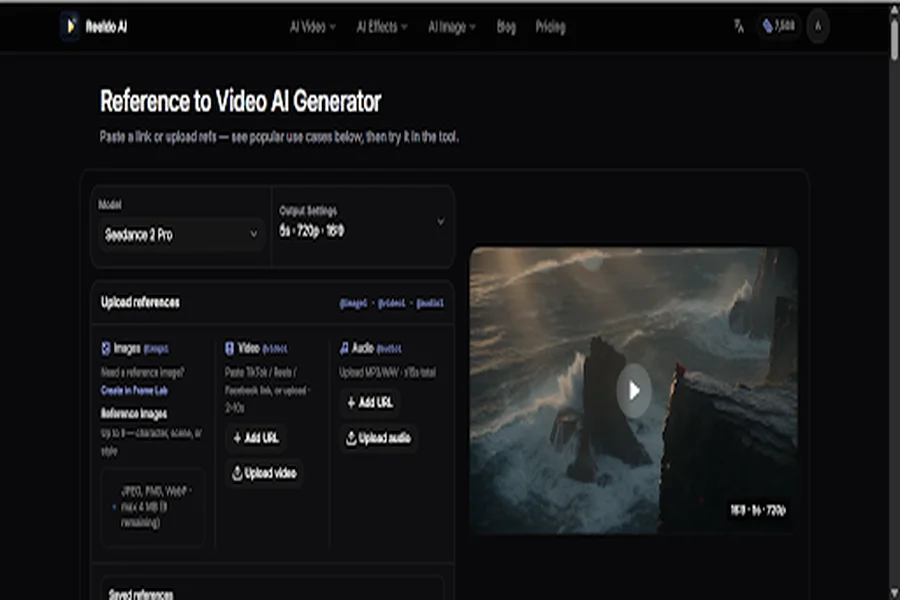
On Reeldo AI, Reference Studio is the centerpiece for that workflow. Paste TikTok, Reels, or Facebook links, or upload your own assets. Use @tags in the prompt to point at specific files—so the model knows which upload is the face, which is the texture, which is the motion to echo. Quote curators can keep a small “mood library” (rain on glass, candlelight, handwritten notes, city bokeh) and reuse it across dozens of clips while the feed still feels coherent.
For a structured walkthrough of multimodal inputs and tagging, see Reeldo AI’s AI reference to video page—it mirrors what you will use inside the studio.
What Reeldo AI does best (and where it fits your calendar)
Text to video is the fastest path when you already know the emotional beat: describe a scene—“envelope on a windowsill, soft piano, autumn light, slow push-in”—and export vertical or horizontal clips without a shoot.
Image to video starts from a still: a licensed photo, a typographic card, or a portrait beside a poem. Reeldo AI animates motion and, on supported models, can add native sound so the clip feels like a miniature film, not a silent loop you fix in another app.
Video to video helps when you need the same motion with a different season, palette, or intensity—useful when one quote performs on TikTok but needs a softer cut for YouTube or email.
URL to video and file to video extend the same idea to long-form pages: a public article, landing URL, PDF, or slide deck can become a short teaser. If you run a quotes site plus essays or newsletters, Reeldo AI can turn a heartfelt post into a 9:16 opener without rewriting the whole story for video.
Behind the scenes, Reeldo AI routes jobs across multiple model families—Seedance, Kling, Veo, Gemini Omni, MiniMax H3, Runway, Wan, and more—so you can trade speed, resolution (including 4K on higher tiers), length, and reference limits without juggling separate vendor accounts. Multi-shot options on some Kling paths even let you plan several beats in one generation, which pairs well with quote carousels that used to be static slides.
Scenarios publishers on inspiration sites recognize
Daily social cadence. Three lines a day becomes manageable when Reeldo AI batch-generates backgrounds that match tone—romantic, reflective, playful—from the same reference set.
Seasonal campaigns. Valentine’s week, anniversaries, and “long distance” themes need repeatable visuals. Reference Studio keeps motifs consistent while only the on-screen text changes in your editor.
Guest poets and collaborators. Share reference portraits and ambient clips with clear @tag instructions; partners focus on wording while Reeldo AI handles motion and sound beds.
Traffic back to your archive. Teaser clips that echo your site’s aesthetic beat generic stock and give readers a reason to click through to the full quote collection.
Reach without a crew. Integrated audio and readable pacing help audiences who watch first and skim later—without hiring production for every aphorism.
A simple Reeldo AI workflow
Collect five to ten references: two lighting moods, one hands-only or silhouette clip, one texture, optional licensed ambient audio. Write one sentence per quote—“tender, not saccharine; evening interior; slow camera.” Open Reeldo AI, choose Reference Studio or image-to-video, read the credit estimate, generate, and save the references that worked. When a clip is close, tweak @tags or try an adjacent model tier before you discard the concept—Reeldo AI keeps those iterations in one dashboard.
Credits and sustainable output
Reeldo AI bills with credits, subscriptions, and packs. For indie publishers, upfront estimates matter: AI video becomes a line item in the content calendar, not a surprise invoice. Simple browser-side fixes on the site can avoid spending credits on minor crops—small savings that add up when you publish daily.
Final word
Quotes survive because they say in one line what someone else could not say out loud. Video adds feeling before the text is even read. Reeldo AI does not replace voice or taste; it lowers the wall between a line on your page and a clip someone sends at midnight. Whether you start with words, a photograph, or a folder of references, Reeldo AI meets that process where it already lives—and leaves you more time to choose the right sentence, not the right camera angle.
